BLOGchart

How to Easily Transfer Gallery Photos to PC Using Samsung Dex

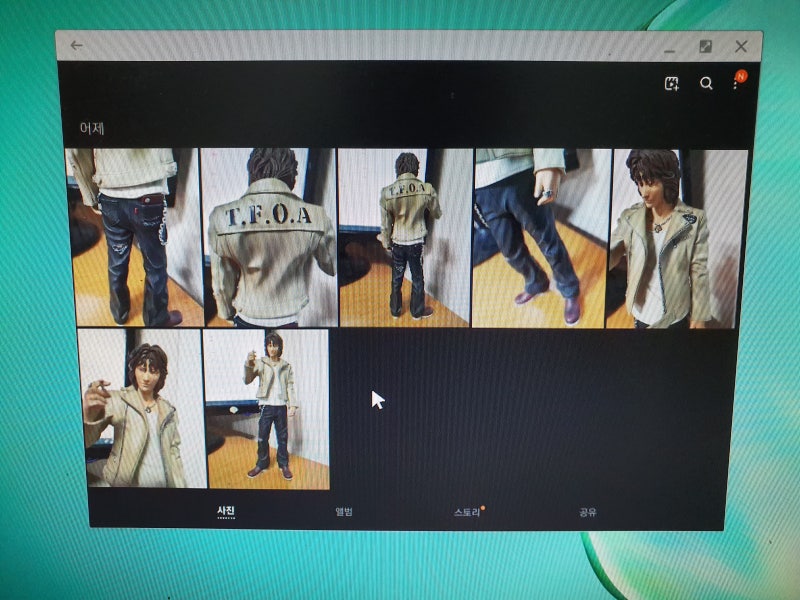
There is significant interest in how to transfer gallery photos from a Samsung Galaxy Note 10 to a PC using Samsung Dex. Many users are looking for convenient ways to directly move photos to their computers, rather than relying on cloud services or messengers. This method is particularly useful for enhancing efficiency in tasks like blog posting.

The key to transferring gallery photos to a PC via Dex lies in the concept of "pressing and holding." After launching the gallery in Dex, long-press the desired photo with the left mouse button to enter selection mode. Once multiple photos are selected, long-press them again to switch to drag mode. Then, drag the selected photos outside the Dex window to your PC's desktop to complete the file transfer.

Bloggers emphasize that while it might be confusing at first, understanding the simple principle of "long-pressing" makes photo transfers very convenient. This feature is highly valued by users who frequently handle many photos, as it saves time and streamlines their workflow.

How to Transfer Gallery Photos from Note 10 to PC with Samsung DeX! Easy and Useful Tip!
Verified Source 100K▲

How to Transfer Gallery Photos from Note 10 to PC with Samsung DeX! Easy and Useful Tip!

IncellDREAM
2019.10.03

There is significant interest in how to transfer gallery photos from a Samsung Galaxy Note 10 to a PC using Samsung Dex. Many users are looking for convenient ways to directly move photos to their computers, rather than relying on cloud services or messengers. This method is particularly useful for enhancing efficiency in tasks like blog posting.

The key to transferring gallery photos to a PC via Dex lies in the concept of "pressing and holding." After launching the gallery in Dex, long-press the desired photo with the left mouse button to enter selection mode. Once multiple photos are selected, long-press them again to switch to drag mode. Then, drag the selected photos outside the Dex window to your PC's desktop to complete the file transfer.

Bloggers emphasize that while it might be confusing at first, understanding the simple principle of "long-pressing" makes photo transfers very convenient. This feature is highly valued by users who frequently handle many photos, as it saves time and streamlines their workflow.

🧭

Trending Topics by Category

Idol comebacks, music charts & global fandom buzz

Blog Ranking & Official Badges

Big data-certified official badges for top-tier creators

Check Ranking
👑 Top 1–3,000 Grand Master
💎 Top 10,000 Premium Creator
🏆 Top 30,000 Excellence Creator
🚀 Top 500,000 Rising Creator

Connect & Community Guide

Interact with verified bloggers and expand your network

Connect Neighbors
This service curates publicly available web posts using our blog ranking algorithm.
If you do not wish your blog to be featured, please submit an inquiry.